
hexo landscape主题添加公告板
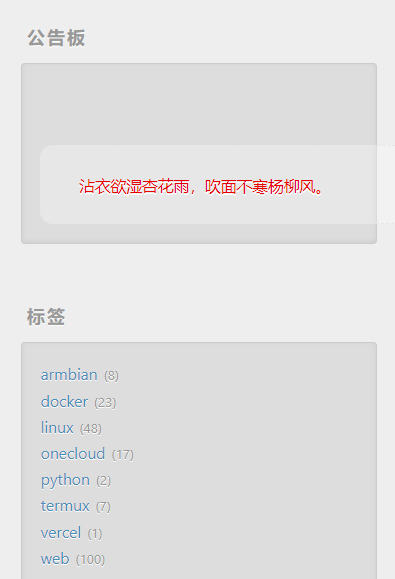
给hexo默认主题添加了一个公告板,可以显示自定义语句,随机一言或每日诗词。
把公告板作为widget显示在侧边栏上。
创建broadcast.ejs文件
位置:/layout/_partial/
<% if (theme.broadcast.type===1 && theme.broadcast.text){ %>
<div class="notice" style="margin-top:50px">
    <i class="fa <%- theme.broadcast.icon -%>"></i>
    <div class="notice-content"><%= theme.broadcast.text %></div>
</div>
<% } %>
<% if (theme.broadcast.type===2){ %>
<div class="notice" style="margin-top:50px">
    <i class="fa <%- theme.broadcast.icon -%>"></i>
    <div class="notice-content" id="broad"></div>
</div>
<script type="text/javascript">
   fetch('https://v1.hitokoto.cn')
    .then(response => response.json())
    .then(data => {
      document.getElementById("broad").innerHTML=data.hitokoto;
    })
    .catch(console.error)
</script>
<% } %>
<% if (theme.broadcast.type===3){ %>
    <div class="notice" style="margin-top:50px">
        <i class="fa <%- theme.broadcast.icon -%>"></i>
        <div class="notice-content"><span id="jinrishici-sentence">正在加载今日诗词....</span></div>
        <script src="https://sdk.jinrishici.com/v2/browser/jinrishici.js" charset="utf-8" async></script>
    </div>
    <% } %>
<style>
.notice {
    padding: 20px;
    border: 1px dashed #e6e6e6;
    color: #f90606;
    position: relative;
    display: inline-block;
    width: 100%;
    background: #fbfbfb50;
    border-radius: 10px;
}
.notice i{
    float: left;
    color: #999;
    font-size: 18px;
    padding-right: 10px;
    vertical-align: middle;
    margin-top:3px;
}
.notice-content{
    display: initial;
    vertical-align: middle;
}
</style>
<link rel="stylesheet" href="https://cdn.jsdelivr.net/npm/font-awesome@4.7.0/css/font-awesome.min.css">
增加了type=3显示每日诗词。
添加broadcast_widget.ejs文件
位置:/layout/_widget/
<% if (theme.broadcast.enable){ %>
    <div class="widget-wrap">
        <h3 class="widget-title">公告板</h3>
        <div class="widget">
            <%- partial('_partial/broadcast') %>
        </div>
      </div>

    <% } %>
主题配置_config.landscape.yml修改
- 1
widgets:
- broadcast_widget
公告板放在侧边栏最上面。
- 2
broadcast:
  enable: true   #true开启,false关闭
  icon:   #fontawesome图标库,格式如示例 fa-bookmark
  type: 3 #1:自定义输入,2:一言api 3:今日诗词
  text: 持续更新中...  #type为1时有效
参考:
Hexo博客 | 如何在博客首页添加公告板模块 ayer主题方案