
termux中安装alpine, alpine里安装docker
termux只是一个linux模拟环境,不是真正的系统,要安装docker,需要先用qemu建立linux虚拟机,在虚拟机上安装alpine,在alpine里安装docker。本文得到的是x86-64版本的docker。
termux内操作
打开 Termux
pkg update -y && pkg upgrade -y
安装必要的依赖
pkg install qemu-utils qemu-common qemu-system-x86_64-headless wget -y
建立目录
mkdir alpine && cd alpine
下载Alpine Linux 3.20.2 iso
wget http://dl-cdn.alpinelinux.org/alpine/v3.20/releases/x86_64/alpine-virt-3.20.2-x86_64.iso
创建磁盘
qemu-img create -f qcow2 alpine.img 5G
启动
qemu-system-x86_64 -machine q35 -m 2024 -smp cpus=2 -cpu qemu64 -drive if=pflash,format=raw,read-only=on,file=$PREFIX/share/qemu/edk2-x86_64-code.fd -netdev user,id=n1,hostfwd=tcp::2222-:22 -device virtio-net,netdev=n1 -cdrom alpine-virt-3.20.2-x86_64.iso -nographic alpine.img
虚拟机内部操作
用root登录,无密码
设置网络
setup-interfaces
直接选默认
ifup eth0
安装到虚拟机硬盘
setup-alpine
mirrors自动选择
安装过程一览:
localhost:~# setup-alpine


 ALPINE LINUX INSTALL
----------------------

 Hostname
----------
Enter system hostname (fully qualified form, e.g. 'foo.example.org') [localhost] alpine

 Interface
-----------
Available interfaces are: eth0.
Enter '?' for help on bridges, bonding and vlans.
Which one do you want to initialize? (or '?' or 'done') [eth0]
Ip address for eth0? (or 'dhcp', 'none', '?') [10.0.2.15]
Netmask? [255.0.0.0]
Gateway? (or 'none') [10.0.2.2]
Configuration for eth0:
  type=static
  address=10.0.2.15
  netmask=255.0.0.0
  gateway=10.0.2.2
Do you want to do any manual network configuration? (y/n) [n]
DNS domain name? (e.g 'bar.com')
DNS nameserver(s)? [10.0.2.3]

 Root Password
---------------
Changing password for root
New password:
Bad password: too short
Retype password:
passwd: password for root changed by root

 Timezone
----------
Africa/            Egypt              Iran               Poland
America/           Eire               Israel             Portugal
Antarctica/        Etc/               Jamaica            ROC
Arctic/            Europe/            Japan              ROK
Asia/              Factory            Kwajalein          Singapore
Atlantic/          GB                 Libya              Turkey
Australia/         GB-Eire            MET                UCT
Brazil/            GMT                MST                US/
CET                GMT+0              MST7MDT            UTC
CST6CDT            GMT-0              Mexico/            Universal
Canada/            GMT0               NZ                 W-SU
Chile/             Greenwich          NZ-CHAT            WET
Cuba               HST                Navajo             Zulu
EET                Hongkong           PRC                leap-seconds.list
EST                Iceland            PST8PDT            posixrules
EST5EDT            Indian/            Pacific/

Which timezone are you in? [UTC] Asia
Aden           Chongqing      Jerusalem      Novokuznetsk   Tashkent
Almaty         Chungking      Kabul          Novosibirsk    Tbilisi
Amman          Colombo        Kamchatka      Omsk           Tehran
Anadyr         Dacca          Karachi        Oral           Tel_Aviv
Aqtau          Damascus       Kashgar        Phnom_Penh     Thimbu
Aqtobe         Dhaka          Kathmandu      Pontianak      Thimphu
Ashgabat       Dili           Katmandu       Pyongyang      Tokyo
Ashkhabad      Dubai          Khandyga       Qatar          Tomsk
Atyrau         Dushanbe       Kolkata        Qostanay       Ujung_Pandang
Baghdad        Famagusta      Krasnoyarsk    Qyzylorda      Ulaanbaatar
Bahrain        Gaza           Kuala_Lumpur   Rangoon        Ulan_Bator
Baku           Harbin         Kuching        Riyadh         Urumqi
Bangkok        Hebron         Kuwait         Saigon         Ust-Nera
Barnaul        Ho_Chi_Minh    Macao          Sakhalin       Vientiane
Beirut         Hong_Kong      Macau          Samarkand      Vladivostok
Bishkek        Hovd           Magadan        Seoul          Yakutsk
Brunei         Irkutsk        Makassar       Shanghai       Yangon
Calcutta       Istanbul       Manila         Singapore      Yekaterinburg
Chita          Jakarta        Muscat         Srednekolymsk  Yerevan
Choibalsan     Jayapura       Nicosia        Taipei

What sub-timezone of 'Asia' are you in? Shanghai

 * Seeding random number generator ...
 * Saving 256 bits of non-creditable seed for next boot
 [ ok ]
 * Starting busybox acpid ...
 [ ok ]
 * Starting busybox crond ...
 [ ok ]

 Proxy
-------
HTTP/FTP proxy URL? (e.g. 'http://proxy:8080', or 'none') [none]

 Network Time Protocol
-----------------------
Thu Jul 10 22:04:52 CST 2025
Which NTP client to run? ('busybox', 'openntpd', 'chrony' or 'none') [chrony]
 * service chronyd added to runlevel default
 * Caching service dependencies ...
 [ ok ]
 * Starting chronyd ...
 [ ok ]

 APK Mirror
------------
 (f)    Find and use fastest mirror
 (s)    Show mirrorlist
 (r)    Use random mirror
 (e)    Edit /etc/apk/repositories with text editor
 (c)    Community repo enable
 (skip) Skip setting up apk repositories

Enter mirror number or URL: [1] f

Finding fastest mirror...
0.94 http://dl-cdn.alpinelinux.org/alpine/
5.54 http://uk.alpinelinux.org/alpine/
0.92 http://mirror.yandex.ru/mirrors/alpine/
0.85 http://mirrors.gigenet.com/alpinelinux/
0.81 http://mirror1.hs-esslingen.de/pub/Mirrors/alpine/
1.27 http://mirror.leaseweb.com/alpine/
1.16 http://mirror.fel.cvut.cz/alpine/
wget: download timed out
0.75 http://alpine.mirror.wearetriple.com/
0.87 http://mirror.clarkson.edu/alpine/
1.11 http://mirror.aarnet.edu.au/pub/alpine
1.01 http://mirrors.dotsrc.org/alpine/
0.7 http://ftp.halifax.rwth-aachen.de/alpine/
wget: server returned error: HTTP/1.1 403 Forbidden
wget: server returned error: HTTP/1.1 403 Forbidden
0.45 http://mirrors.nju.edu.cn/alpine/
2.33 http://mirror.lzu.edu.cn/alpine/
0.96 http://mirror.accum.se/mirror/alpinelinux.org/
wget: server returned error: HTTP/1.1 403 Forbidden
1.08 http://mirror.csclub.uwaterloo.ca/alpine/
0.96 http://pkg.adfinis.com/alpine/
wget: download timed out
1.13 http://mirrors.ircam.fr/pub/alpine/
5.67 http://mirror.math.princeton.edu/pub/alpinelinux/
wget: server returned error: HTTP/1.1 500 Internal Server Error
0.96 http://ftp.icm.edu.pl/pub/Linux/distributions/alpine/
1.3 http://mirror.ungleich.ch/mirror/packages/alpine/
0.92 http://mirrors.edge.kernel.org/alpine/
0.68 http://ap.edge.kernel.org/alpine/
0.94 http://eu.edge.kernel.org/alpine/
wget: server returned error: HTTP/1.1 404 Not Found
2.19 http://mirror.reenigne.net/alpine/
wget: can't connect to remote host (84.2.242.231): Connection refused
1.43 http://tux.rainside.sk/alpine/
0.51 http://alpine.cs.nycu.edu.tw/
wget: server returned error: HTTP/1.1 403 Forbidden
wget: download timed out
wget: download timed out
1.45 http://alpinelinux.c3sl.ufpr.br
0.93 http://foobar.turbo.net.id/alpine/
1.48 http://alpine.ccns.ncku.edu.tw/alpine/
wget: download timed out
1.45 http://mirror.kumi.systems/alpine
wget: download timed out
0.84 http://alpine.northrepo.ca
0.8 http://mirrors.ocf.berkeley.edu/alpine/
1.22 http://mirrors.pardisco.co/alpine/
0.49 http://mirrors.aliyun.com/alpine/
1.25 http://mirror.alwyzon.net/alpine/
wget: server returned error: HTTP/1.1 403 Forbidden
0.81 http://ftpmirror2.infania.net/mirror/alpine/
wget: server returned error: HTTP/1.1 404 Not Found
0.84 http://mirror.fcix.net/alpine/
wget: download timed out
0.97 http://mirror.2degrees.nz/alpine/
0.9 http://mirror.kku.ac.th/alpine
1.44 http://mirror.uepg.br/alpine
0.39 http://mirrors.neusoft.edu.cn/alpine/
0.69 http://ftp.udx.icscoe.jp/Linux/alpine/
1.24 http://alpinelinux.mirror.garr.it/
1.53 http://mirrors.hostico.ro/alpinelinux/
2.93 http://mirror.serverion.com/alpine/
0.9 http://ftp.lysator.liu.se/pub/alpine/
3.5 http://mirror.mangohost.net/alpine/
0.99 http://mirror.bahnhof.net/pub/alpinelinux/
0.91 http://mirror.vinehost.net/alpine/
wget: server returned error: HTTP/1.1 451
1.32 http://mirror.5i.fi/alpine/
0.52 http://mirror.jingk.ai/alpine/
0.4 http://mirror.nyist.edu.cn/alpine/
wget: server returned error: HTTP/1.1 404 Not Found
0.57 http://repo.jing.rocks/alpine/
1.93 http://mirror.marwan.ma/alpine
5.65 http://mirror.pilotfiber.com/alpinelinux/
1.56 http://alpine.koyanet.lv/
0.78 http://mirrors.hosterion.ro/alpinelinux/
0.81 http://mirror.tux.si/alpine
wget: server returned error: HTTP/1.1 503 Service Temporarily Unavailable
wget: server returned error: HTTP/1.1 503 Service Temporarily Unavailable
1.19 http://mirrors.neterra.net/alpine/
wget: error getting response: Connection reset by peer
0.99 http://mirror.raiolanetworks.com/alpine/
1.45 http://elmirror.cl/alpine/
1.02 http://alpinelinux.mirrors.ovh.net/
1.54 http://debian.ethz.ch/alpine/
1.3 http://mirror.leitecastro.com/alpine
0.94 http://pkg.adfinis-on-exoscale.ch/alpine/
0.41 http://mirrors.hust.edu.cn/alpine/
wget: download timed out
1.2 http://mirror.quantum5.ca/alpine/
1.8 http://mirror.cs.odu.edu/alpine/
0.93 http://mirror.telepoint.bg/alpine/
Added mirror mirrors.neusoft.edu.cn
Updating repository indexes... done.

 User
------
Setup a user? (enter a lower-case loginname, or 'no') [no] qs
Full name for user qs [qs] qs
Changing password for qs
New password:
Bad password: too short
Retype password:
passwd: password for qs changed by root
Enter ssh key or URL for qs (or 'none') [none]
(1/1) Installing doas (6.8.2-r7)
Executing busybox-1.36.1-r29.trigger
OK: 18 MiB in 37 packages
Which ssh server? ('openssh', 'dropbear' or 'none') [openssh]
 * service sshd added to runlevel default
ssh-keygen: generating new host keys: RSA ECDSA ED25519
 * Starting sshd ...
 [ ok ]

 Disk & Install
----------------
Available disks are:
  sda	(32.2 GB ATA      QEMU HARDDISK   )

Which disk(s) would you like to use? (or '?' for help or 'none') [none] sda

The following disk is selected:
  sda	(32.2 GB ATA      QEMU HARDDISK   )

How would you like to use it? ('sys', 'data', 'crypt', 'lvm' or '?' for help) [?] sys

WARNING: The following disk(s) will be erased:
  sda	(32.2 GB ATA      QEMU HARDDISK   )

WARNING: Erase the above disk(s) and continue? (y/n) [n] y
Creating file systems...
mkfs.fat 4.2 (2021-01-31)
Installing system on /dev/sda3:
Installing for x86_64-efi platform.
Installation finished. No error reported.
100% ████████████████████████████████████████████==> initramfs: creating /boot/initramfs-virt for 6.6.96-0-virt
Generating grub configuration file ...
Found linux image: /boot/vmlinuz-virt
Found initrd image: /boot/initramfs-virt
Warning: os-prober will not be executed to detect other bootable partitions.
Systems on them will not be added to the GRUB boot configuration.
Check GRUB_DISABLE_OS_PROBER documentation entry.
Adding boot menu entry for UEFI Firmware Settings ...
done

Installation is complete. Please reboot.
安装完成后,关闭虚拟机(命令 poweroff -f)。root用户密码为1234。
启动方法
启动命令run_qemu.sh:
qemu-system-x86_64 -machine q35 -m 2048 -smp cpus=2 -cpu qemu64 -drive if=pflash,format=raw,read-only=on,file=$PREFIX/share/qemu/edk2-x86_64-code.fd -netdev user,id=n1,hostfwd=tcp::2222-:22 -device virtio-net,netdev=n1 -nographic -accel tcg,thread=multi alpine.img
chmod +x run_qemu.sh
运行虚拟机并进入:
./run_qemu.sh
更新系统并安装 Docker:
apk add nano
nano /etc/apk/repositories
取消第三行注释,
apk update && apk add docker
service docker start
rc-update add docker
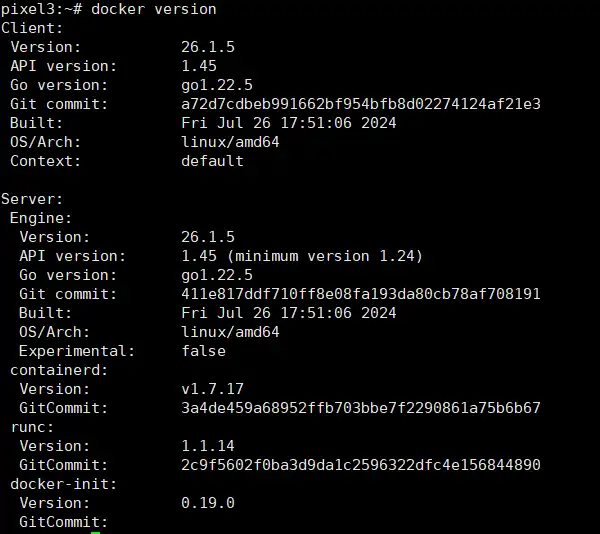
docker version
alpine:/etc/apk# docker version
Client:
 Version:           26.1.5
 API version:       1.45
 Go version:        go1.22.5
 Git commit:        a72d7cdbeb991662bf954bfb8d02274124af21e3
 Built:             Fri Jul 26 17:51:06 2024
 OS/Arch:           linux/amd64
 Context:           default

Server:
 Engine:
  Version:          26.1.5
  API version:      1.45 (minimum version 1.24)
  Go version:       go1.22.5
  Git commit:       411e817ddf710ff8e08fa193da80cb78af708191
  Built:            Fri Jul 26 17:51:06 2024
  OS/Arch:          linux/amd64
  Experimental:     false
 containerd:
  Version:          v1.7.17
  GitCommit:        3a4de459a68952ffb703bbe7f2290861a75b6b67
 runc:
  Version:          1.1.14
  GitCommit:        2c9f5602f0ba3d9da1c2596322dfc4e156844890
 docker-init:
  Version:          0.19.0
  GitCommit:
docker ps

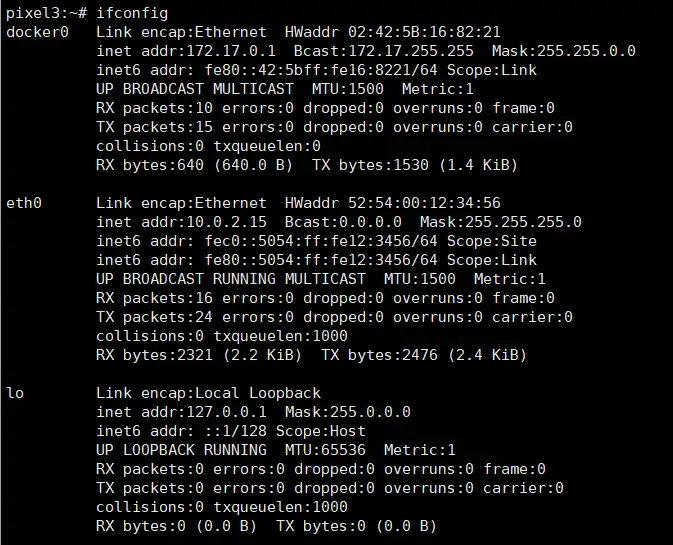
ifconfig
-
安装 rc-service 服务
Alpine使用的是OpenRCinit系统,而rc-service是openrc的一部分,所以安装openrc即可,使用如下命令安装:
apk add openrc --no-cache -
添加自定义服务
nano /etc/init.d/xxx
#!/sbin/openrc-run
name="actc"
command="/path/to/${name}"
#command_background="yes"

depend() {
	after sshd
}
- 管理服务
列出所有可用服务
rc-service –list
启动/停止/重启 已有服务
rc-service 服务名 start/stop/restart
OR
/etc/init.d/服务名 start/stop/restart
设置开机自启动
rc-update add {service-name}
启动命令中的hostfwd=tcp::2222-:22是把内网的22和外部的2222端口关联以便用外部IP访问内网。此方式无法使用桥接方式连接网络,只能用映射端口的方式访问内部容器。
2025年7月10日更新